Introduction to Artificial Intelligence - Homework Assignment 04 (5 pts.)
- Name:
- NETID:
Professor Dingler's Letters
Due October 5, 2026.
This assignment covers:
- Recovering shuffled image rows and rotated color channels
- Support vector machines, margins, and hinge loss
- Implementing an RBF kernel and using it to train an SVM
- Comparing pixel classifiers using intersection over union (IoU)
| Task | Description | Points |
|---|---|---|
| 00 | Load the damaged scans | 0.25 |
| 01 | Recover the rows and colors | 1.00 |
| 02 | Implement margins, hinge loss, and an RBF kernel; explain margin penalties | 1.125 |
| 03 | Prepare pixel features and an overlap score; interpret the baseline | 0.875 |
| 04 | Fit, check, and select an SVM | 1.25 |
| 05 | Evaluate the remaining pages | 0.25 |
| 06 | Report the results to Caulfield | 0.25 |
| 07 | Export the notebook | 0 |
| Total | 5.00 |
Run the cells in order and answer the written questions.
Story Progression
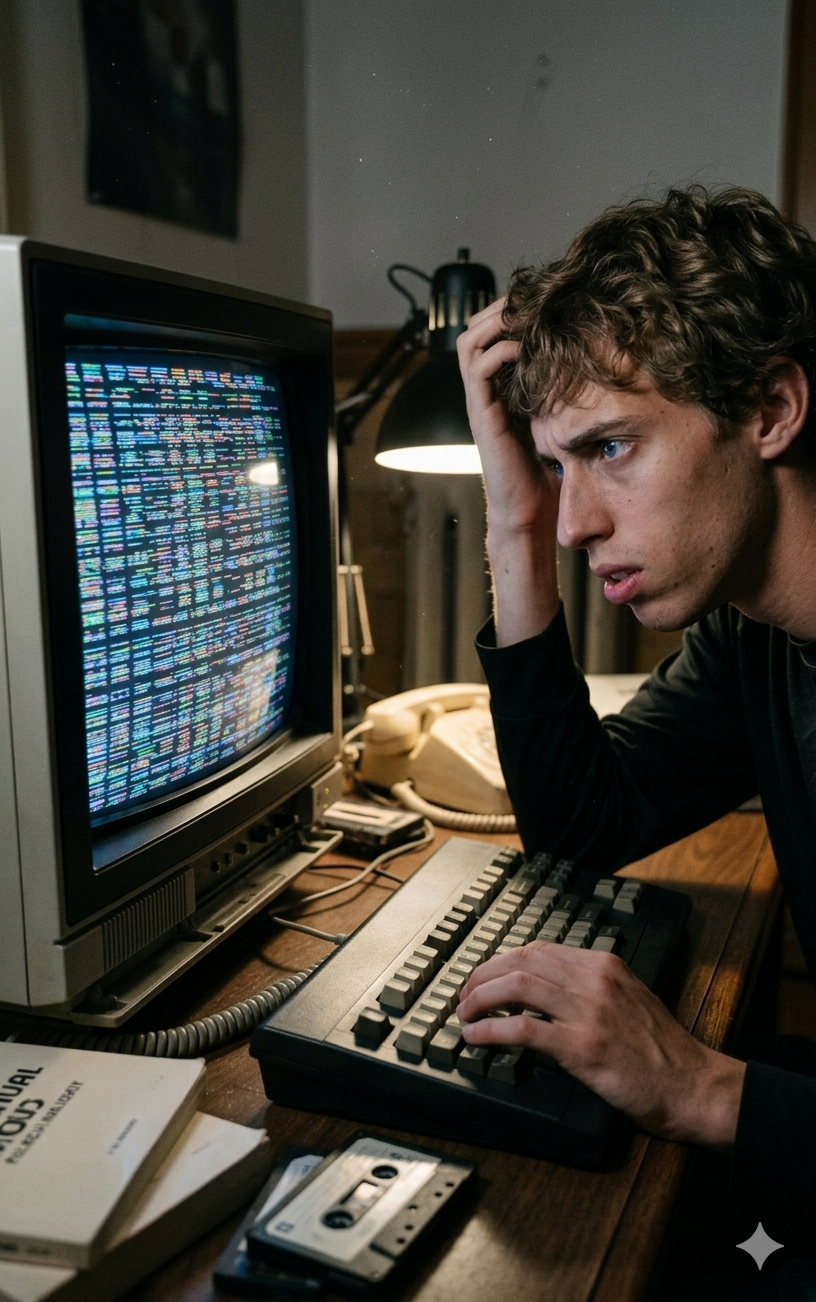
Your witness report sent Caulfield to the study, where he found the envelope associated with Professor Dingler. Inside were four pages assembled from colorful cut-out letters. The forensics team scanned them, then handed the files to the new intern.
Unfortunately, somehow, the new intern managed to shuffle the rows and rotate the color channels. He insists that no information was lost, which is a remarkably optimistic way to describe an unreadable document.
First we'll reverse the damage. Then we'll use support vector machines to classify pixels in the recovered pages. HW03 gave us a perceptron that learned a boundary; this time we'll examine the margin around a boundary and use a kernel when a straight boundary is too restrictive.
The pixels can tell us where printed regions are. Reading the individual characters—and figuring out what the message means—will take more work later in the investigation.
Task 00: Load the Damaged Scans
Task 00-1: Description (0 pts.)
Four Pages, Three Different Jobs
Caulfield has four damaged scans and a set of masks prepared by the forensics team. A mask is a second image that marks the dark printed regions: 255 means foreground and 0 means background. We'll turn those values into True and False for classification.
As in HW02 and HW03, give each set of evidence a different job:
| Pages | Job | When we use their masks |
|---|---|---|
| 1 | Train the classifiers | Now |
| 2 | Compare models and choose settings | Now |
| 3–4 | Check the chosen model on new pages | Task 05 |
Nearby pixels tend to look alike. Keeping whole pages separate lets us ask whether the classifier works on a new page, rather than another pixel beside one it has already seen.
The setup cell downloads the evidence into evidence/homework04/. In Colab, rerunning setup replaces the repository clone; keep your own work in the notebook. Each color image has shape (height, width, 3) and values from 0 to 255.
Your Task
Complete read_rgb(filename):
- Input: the filename of a color image.
- Return: an RGB image with the same height and width, shape
(height, width, 3). - The supplied code loads the file. Convert OpenCV's blue–green–red channel order to red–green–blue before returning it.
The rest of the cell loads all four scans and only the first two masks. The Expected Output section shows the starting appearance of the four scans. The masks identify dark regions, not individual characters; a bright letter on a dark tile can appear as a hole.
Python Help
bgr = cv2.imread('page.png', cv2.IMREAD_COLOR)
rgb = cv2.cvtColor(bgr, cv2.COLOR_BGR2RGB)
mask = cv2.imread('mask.png', cv2.IMREAD_GRAYSCALE) > 0
Useful Links
Task 00-1: Code (0.25 pts.)
import os
import shutil
import subprocess
from pathlib import Path

REPO_URL = 'https://github.com/wtheisen/nd-cse-30124-homeworks.git'

try:
    import google.colab
except ImportError:
    # Reuse a local checkout, including when launched from a homework subfolder.
    DATA_ROOT = next((p for p in [Path.cwd(), *Path.cwd().parents]
                      if (p / '.git').exists() and (p / 'evidence').is_dir()), None)
    if DATA_ROOT is None:
        DATA_ROOT = Path.cwd() / 'nd-cse-30124-homeworks'
else:
    # Leave the old checkout before deleting it, including on a setup-cell rerun.
    os.chdir('/content')
    DATA_ROOT = Path('/content/nd-cse-30124-homeworks')
    # Fetch fresh evidence every time this cell runs in Colab.
    if DATA_ROOT.exists():
        shutil.rmtree(DATA_ROOT)

if not DATA_ROOT.exists():
    subprocess.run(['git', 'clone', REPO_URL, str(DATA_ROOT)], check=True)

if not (DATA_ROOT / '.git').exists():
    raise RuntimeError(f'{DATA_ROOT} exists but is not a Git checkout. Choose a different clone location.')

# All later relative paths now start at the homework repository root.
os.chdir(DATA_ROOT)
DATA_ROOT = Path.cwd()

import cv2
import numpy as np
import pandas as pd
from sklearn.svm import SVC
from sklearn.preprocessing import StandardScaler

EVIDENCE_DIR = DATA_ROOT / 'evidence' / 'homework04'
required = [f'{prefix}_{i}.png' for i in range(1, 5) for prefix in ['scrambled_note', 'mask_page']]
if any(not (EVIDENCE_DIR / name).is_file() for name in required):
    raise FileNotFoundError('HW04 evidence is missing. Rerun the setup cell with an internet connection, or check that your local repository contains the evidence/homework04 files.')
os.chdir(EVIDENCE_DIR)

def read_rgb(filename):
    bgr = cv2.imread(filename, cv2.IMREAD_COLOR)

    if bgr is None:
        raise FileNotFoundError(filename)

    # TODO: Convert OpenCV's BGR channels into RGB.
    return None

def read_mask(filename):
    raw = cv2.imread(filename, cv2.IMREAD_GRAYSCALE)
    if raw is None:
        raise FileNotFoundError(filename)
    return raw > 0

scrambled_pages = [read_rgb(f'scrambled_note_{i}.png') for i in range(1, 5)]
train_mask = read_mask('mask_page_1.png')
val_mask = read_mask('mask_page_2.png')

print('Pages:', len(scrambled_pages))
print('Page shape and type:', scrambled_pages[0].shape, scrambled_pages[0].dtype)
print('Training mask shape and labels:', train_mask.shape, np.unique(train_mask))

# Supplied helper: compare your page images with the Expected Output images.
import matplotlib.pyplot as plt

def show_pages(pages, stage):
    fig, axes = plt.subplots(1, len(pages), figsize=(16, 6), squeeze=False)
    for number, (ax, page) in enumerate(zip(axes[0], pages), 1):
        ax.imshow(page)
        ax.set_title(f'Page {number}')
        ax.axis('off')
    fig.suptitle(stage)
    fig.tight_layout()
    plt.show()

show_pages(scrambled_pages, 'Starting scans: shuffled rows and rotated colors')
Task 00-1: Expected Output (0 pts.)
Pages: 4
Page shape and type: (595, 420, 3) uint8
Training mask shape and labels: (595, 420) [False  True]
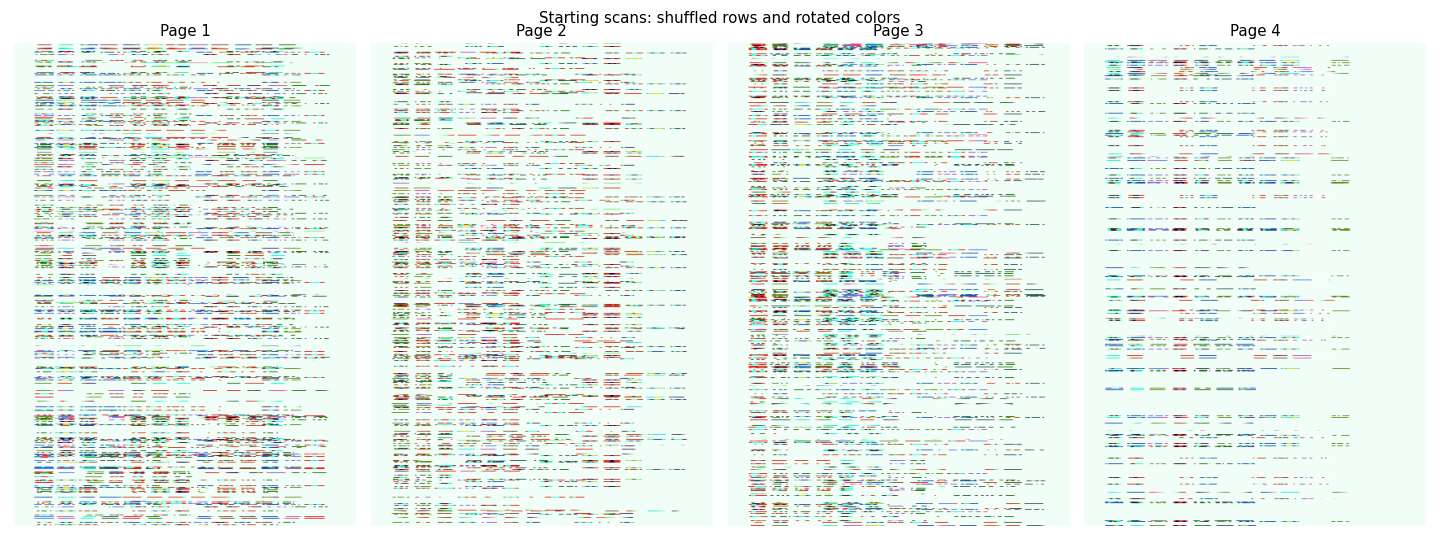
Starting scans: shuffled rows and rotated colors.
Compare the plot produced by your code with this reference image.
Task 01: Recover the Rows and Colors
Task 01-1: Description (0 pts.)
Undo the Row Shuffle
The intern moved whole rows of pixels around. Before tackling a page, let's undo the same mistake on three pretend rows.
Worked Example
original = np.array(['top', 'middle', 'bottom'])
perm = np.array([2, 0, 1])
shuffled = original[perm]       # ['bottom', 'top', 'middle']
inverse = np.argsort(perm)      # [1, 2, 0]
restored = shuffled[inverse]   # ['top', 'middle', 'bottom']
The top row is now at position 1, the middle at position 2, and the bottom at position 0. Those are exactly the positions in inverse.
Fortunately, the forensics analyst recovered the shuffle recipe. The intern converted the image to grayscale, averaged each row, summed those averages, rounded the total, and used it as a random seed. Moving rows changes their order but preserves that sum, so we can reproduce his permutation.
Your Task
Complete unshuffle_rows(image):
- Input: an RGB array of shape
(height, width, 3). - Return: an array of the same shape and type, with its rows restored.
- Use the supplied grayscale image to compute one mean per row with
axis=1. - Sum those means and compute
int(np.round(total)) % (2**31)for the seed. - Use
np.random.RandomState(seed).permutation(image.shape[0])to recreate the shuffle. - Find the inverse permutation and index the image with it.
Keep RandomState here: it reproduces the generator used to damage the scans. The newer default_rng produces a different sequence even with the same seed.
Python Help
small_image = np.array([[10., 20.], [30., 40.]])
row_means = small_image.mean(axis=1)  # [15., 35.]
# Swapping these rows leaves the sum of their means at 50.
The Expected Output section shows all four pages after row recovery. The letter shapes should become recognizable, although their colors still need repair.
Task 01-1: Code (0.5 pts.)
def unshuffle_rows(image):
    gray = cv2.cvtColor(image, cv2.COLOR_RGB2GRAY)

    # TODO: Average each row, then derive the permutation-invariant seed.
    row_means = None
    seed = None
    permutation = None

    # TODO: Invert the permutation and recover the original row order.
    inverse = None

    return image[inverse]

unshuffled_pages = [unshuffle_rows(image) for image in scrambled_pages]
for i, image in enumerate(unshuffled_pages, 1):
    print(f'Page {i}: {image.shape}')

# Supplied visualization: compare your result with Expected Output below.
show_pages(unshuffled_pages, 'Rows restored: colors are still rotated')
Task 01-1: Expected Output (0 pts.)
Page 1: (595, 420, 3)
Page 2: (595, 420, 3)
Page 3: (595, 420, 3)
Page 4: (595, 420, 3)
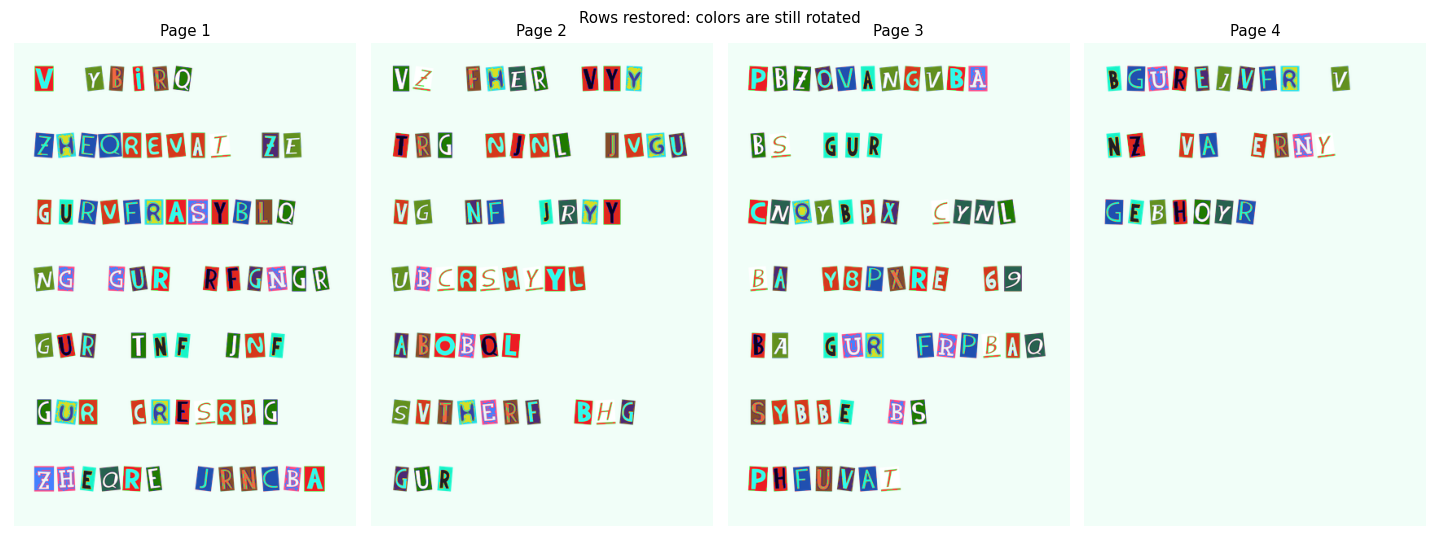
After row recovery: colors are still rotated.
Compare the plot produced by your code with this reference image.
Task 01-2: Description (0 pts.)
Put the Channels Back
The rows are in place, but the intern also rotated the color channels. He grouped pixels by their distance to three key colors and used a different rotation for each group. We'll assign each damaged pixel to its nearest key and reverse that group's rotation.
Worked Example: Compare Two Pixels with Two Keys
Start with tiny RGB values so we can check the arithmetic by hand:
pixels = np.array([[1., 0., 0.], [0., 2., 0.]])  # shape (2, 3)
keys = np.array([[0., 0., 0.], [2., 0., 0.]])    # shape (2, 3)
difference = pixels[:, None, :] - keys[None, :, :]
# difference.shape is (2, 2, 3): pixel, key, color channel
For pixel [0, 2, 0], the differences are [0, 2, 0] and [-2, 2, 0]. Squaring and adding the three channels gives distances 4 and 8, so key 0 is closer.
For both pixels, the squared-distance table is [[1, 1], [4, 8]]. Each row is a pixel; each column is a key. argmin(axis=1) selects one key per pixel, choosing the first when distances tie.
The extra axes let NumPy form every pixel–key comparison. Summing over axis=2 collapses the three color channels into one distance.
Worked Example: Reverse a Rotation
If the original pixel [R, G, B] = [10, 20, 30] became [G, B, R] = [20, 30, 10], indexing the damaged pixel with [2, 0, 1] restores [10, 20, 30].
Your Task
Complete restore_colors(image):
- Input: the row-restored RGB array, shape
(height, width, 3). - Return: a color-restored array of the same shape, with type
uint8.
- Reshape into
(height*width, 3)and convert to floating point before subtracting. Unsigned integers cannot represent negative differences correctly. - Compare every pixel with
KEY_COLORS. Sum squared differences over the color channels and choose the closest key. - Make a copy for the output. For group 0, use channel order
[2, 0, 1]; for group 1, use[1, 2, 0]; leave group 2 alone. - Read each replacement from the unchanged input pixels, then restore the image shape and convert to
uint8.
This color repair is approximate because we choose keys using already altered colors. The Expected Output section shows all four pages after color recovery. Compare the reference images for each stage to see how the rows and colors change.
Python Help
values = np.array([[20., 30., 10.], [5., 6., 7.]])
selected = np.array([True, False])
output = values.copy()
output[selected] = values[selected][:, [2, 0, 1]]
# output is [[10., 20., 30.], [5., 6., 7.]]
Useful Links
Task 01-2: Code (0.5 pts.)
KEY_COLORS = np.array([[50, 40, 35], [200, 180, 170], [120, 140, 100]], dtype=float)

def restore_colors(image):
    # TODO: Make one floating-point RGB row per pixel.
    pixels = None

    # TODO: Calculate squared distances and assign each pixel to its nearest key.
    distances = None
    groups = None

    restored = pixels.copy()

    # TODO: Reverse the two rotations using the unchanged source pixels.
    restored[groups == 0] = None
    restored[groups == 1] = None

    return restored.reshape(image.shape).astype(np.uint8)

recovered_pages = [restore_colors(image) for image in unshuffled_pages]
print('Recovered pages:', len(recovered_pages))
print('Recovered shape and type:', recovered_pages[0].shape, recovered_pages[0].dtype)

# Supplied visualization: compare your result with Expected Output below.
show_pages(recovered_pages, 'Rows and colors restored (color recovery is approximate)')
Task 01-2: Expected Output (0 pts.)
Recovered pages: 4
Recovered shape and type: (595, 420, 3) uint8
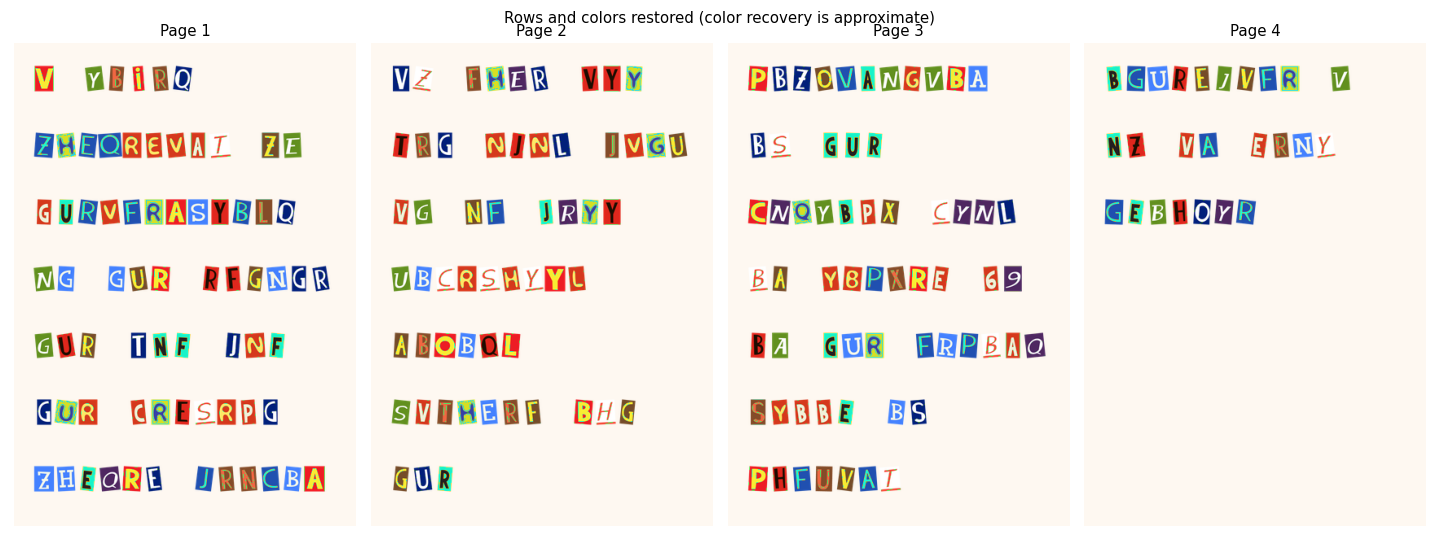
After row and color recovery: color recovery is approximate.
Compare the plot produced by your code with this reference image.
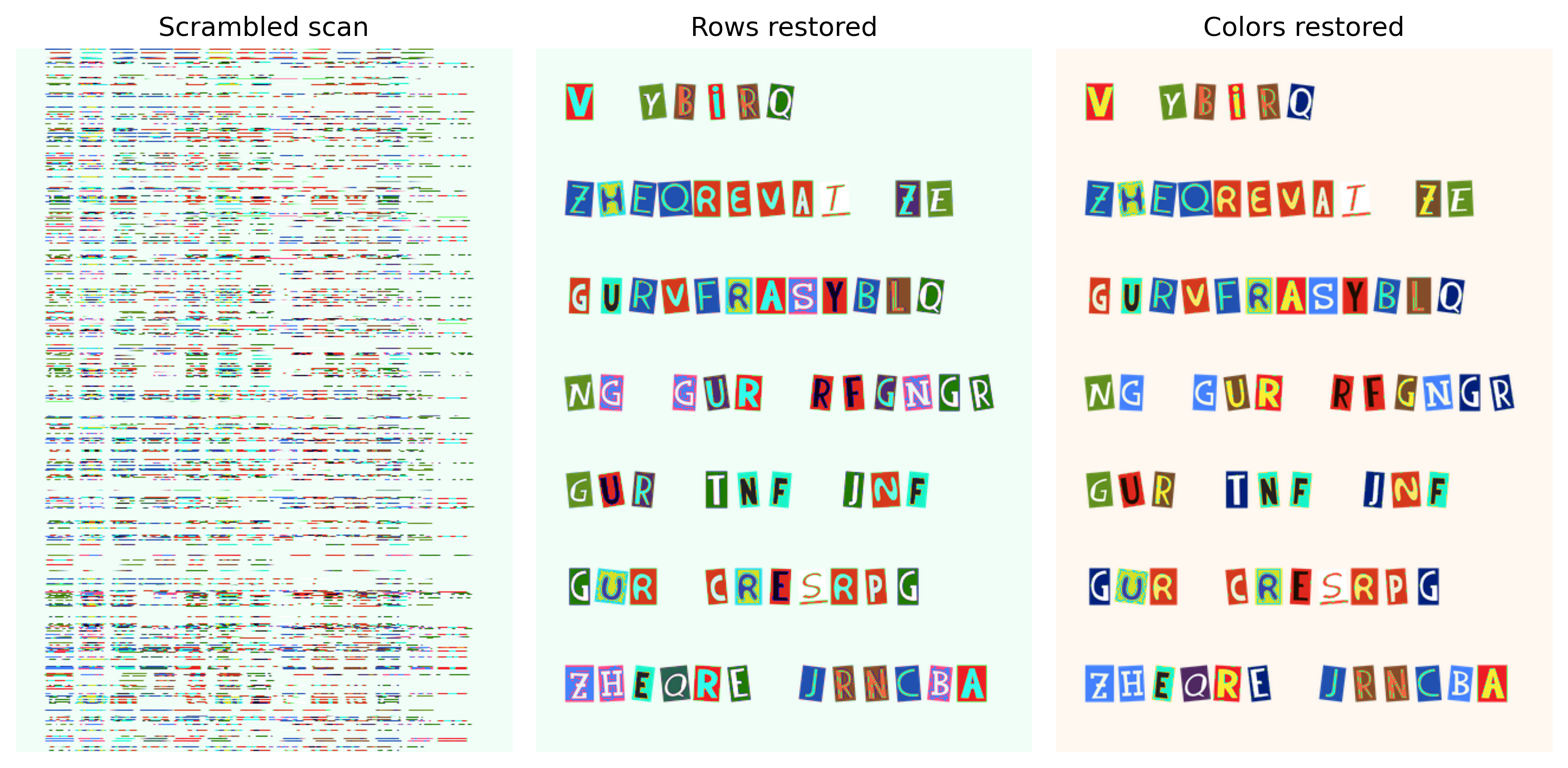
Figure 1. The same page through the recovery pipeline. Row order is recovered exactly; color recovery is approximate.
Story Progression
The pages look like pages again. Caulfield can see the cut-out letters, but the forensics software still needs a mask telling it which pixels belong to the printed material.
The intern proposes drawing a rectangle around the entire page. Technically, this includes all the evidence. Caulfield would prefer something more selective.
Task 02: What Makes an SVM Different?
Task 02-1: Description (0 pts.)
Correct Is Not Always Far Enough
The perceptron in HW03 changed its weights when its predicted label was wrong. A support vector machine also cares about the margin around the boundary.
For a linear score $s_i=x_iw+b$ and signed label $t_i\in\{-1,+1\}$, define
$$m_i=t_i(x_iw+b),\qquad h_i=\max(0,1-m_i).$$
A negative margin means a mistake. A margin between zero and one is correctly classified but still inside the desired margin: it receives hinge loss too. A margin at least one receives zero hinge loss.
The linear soft-margin objective is
$$J(w,b)=\frac12\|w\|^2+C\sum_i h_i.$$
The first term discourages large weights. Under this score normalization, the distance between the two margin lines is $2/\|w\|$. Larger C makes margin violations more expensive; smaller C tolerates more violations to favor a wider margin.
Worked Example
For one example, suppose x=[1, 2], w=[1, -1], b=0, and the true label is t=-1.
- Score:
1*1 + 2*(-1) = -1. - Signed margin:
(-1)*(-1) = 1. - Hinge loss:
max(0, 1-1) = 0.
Multiplying by the true label lets positive and negative examples use the same margin test. Here the prediction has the correct sign and reaches the required margin.
Your Task
Use X with shape (n, d), signed targets with shape (n,), weights with shape (d,), and scalar bias and C.
signed_margins(...)returns one signed margin per example, shape(n,).hinge_losses(margins)returns one nonnegative loss per example, shape(n,).linear_svm_objective(...)returns a scalar: half the sum of squared weights plusCtimes the sum of hinge losses.
Keep the bias separate from the weights and out of the penalty. Scikit-learn will fit the SVM later; these functions let us inspect what it is trying to minimize.
Python Help
scores = np.array([-2., 3.])
labels = np.array([-1., 1.])
print(labels * scores)             # [2., 3.]
print(np.maximum(0., [-1., 0.5]))  # [0., 0.5]
Task 02-1: Code (0.5 pts.)
def signed_margins(X, targets, weights, bias):
    # TODO: Compute each score and multiply by its signed target.
    return None

def hinge_losses(margins):
    # TODO: Penalize margins below one, clipping negative losses to zero.
    return None

def linear_svm_objective(X, targets, weights, bias, C):
    # TODO: Combine the weight penalty and SUM of hinge losses.
    return None

example_X = np.array([[2., 0.], [.5, 0.], [0., 1.]])
example_t = np.array([1, 1, 1])
example_w = np.array([1., -1.])

margins = signed_margins(example_X, example_t, example_w, 0.)

print('Signed margins:', margins)
print('Hinge losses:', hinge_losses(margins))
print('Objective at C=1:', linear_svm_objective(example_X, example_t, example_w, 0., 1.))
Task 02-1: Expected Output (0 pts.)
Signed margins: [ 2.   0.5 -1. ]
Hinge losses: [0.  0.5 2. ]
Objective at C=1: 3.5
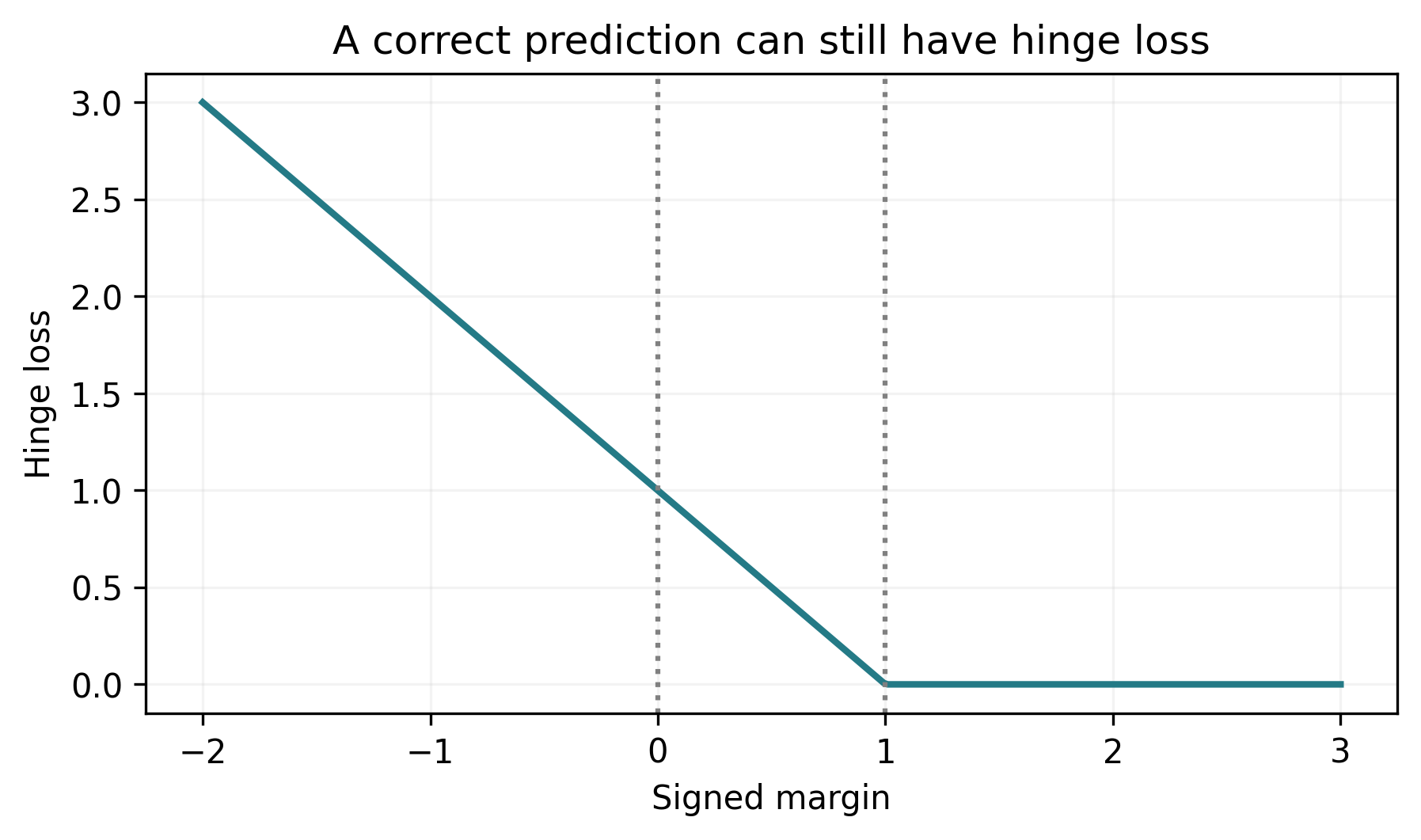
Figure 2. Margins below zero are mistakes; margins between zero and one are correct but still penalized.
Task 02-2: Description (0 pts.)
Implement an RBF Kernel
A linear SVM separates feature vectors with a straight boundary. A kernel lets an SVM compare examples as if they had been mapped into another feature space, without explicitly constructing that space.
The radial basis function kernel is
$$K(x,z)=\exp(-\gamma\|x-z\|^2).$$
Identical vectors have similarity one. More distant vectors have smaller similarity. Larger $\gamma$ makes similarity fall faster with distance, allowing more local behavior.
Worked Example: One Pair, Then a Table
Take a=[1, 0], b=[0, 2], and gamma=0.5. Their squared distance is 1 + 4 = 5, so their similarity is exp(-2.5), approximately 0.0821.
Now let A contain two examples and B contain three. We need six comparisons:
| B row 0 | B row 1 | B row 2 | |
|---|---|---|---|
| A row 0 | K(A0, B0) | K(A0, B1) | K(A0, B2) |
| A row 1 | K(A1, B0) | K(A1, B1) | K(A1, B2) |
The result has shape (2, 3), even if each example has many features.
Your Task
Complete rbf_kernel(A, B, gamma):
- Inputs:
Aof shape(n, d),Bof shape(m, d), and a positive scalargamma. - Return: an
(n, m)matrix whose entry[i, j]comparesA[i]withB[j].
Use $\|a-b\|^2=\|a\|^2+\|b\|^2-2a\cdot b$:
- Sum squared features within each row of
A; make the result a column, shape(n, 1). - Do the same for
B, but make a row, shape(1, m). - Add those arrays and subtract
2 * (A @ B.T). Every term now expands to(n, m). - Clip small negative distances to zero, then apply the exponential.
Compare your printed matrix with the expected output below before moving to the image data.
Python Help
row_norms = np.array([1., 4.])[:, None]       # (2, 1)
column_norms = np.array([0., 4., 1.])[None, :] # (1, 3)
print(row_norms + column_norms)
# [[1., 5., 2.],
#  [4., 8., 5.]]
Useful Links
Task 02-2: Code (0.5 pts.)
def rbf_kernel(A, B, gamma):
    A, B = np.asarray(A, dtype=float), np.asarray(B, dtype=float)

    # TODO: Form all pairwise squared distances using norms and a matrix product.
    squared_distances = None

    # TODO: Clip small negative squared distances to zero.
    squared_distances = None

    # TODO: Turn distance into RBF similarity.
    return None

example_A = np.array([[0., 0.], [1., 0.]])
example_B = np.array([[0., 0.], [0., 2.], [1., 0.]])
example_K = rbf_kernel(example_A, example_B, gamma=.5)

print(np.round(example_K, 4))
Task 02-2: Expected Output (0 pts.)
[[1.     0.1353 0.6065]
 [0.6065 0.0821 1.    ]]
Task 02-3: Written Response (0.125 pts.)
In the three-example check, which example is classified correctly but still receives hinge loss? Use its score and margin to explain why. Looking at the objective, how does increasing C change the tradeoff? Compare its role with Ridge alpha in HW02.
[ANSWER]
Task 03: Turn Pixels into Examples
Task 03-1: Description (0 pts.)
Color and a Little Neighborhood Context
Caulfield can point to the printed parts of a page. Our classifier needs that decision expressed as a table: one pixel per row, with numerical features describing it.
We'll use six features: the pixel's red, green, and blue values, followed by the average red, green, and blue values in its surrounding 5-by-5 patch. The supplied cv2.blur computes those neighborhood means.
Worked Example: Keep Each Pixel with Its Label
A 2-by-2 RGB image has shape (2, 2, 3). Reshaping it to (4, 3) lists pixels in this order: top-left, top-right, bottom-left, bottom-right.
mask = np.array([[True, False], [False, True]])
print(mask.reshape(-1))  # [True, False, False, True]
Flattening the mask in the same order keeps each feature row paired with the correct label. If one pixel has RGB values [255, 0, 0] and neighborhood means [0.5, 0.2, 0.1] on the 0–1 scale, its six-feature row is [1, 0, 0, 0.5, 0.2, 0.1].
Your Task
Complete extract_features(image):
- Input: an RGB array of shape
(height, width, 3)with values 0–255. - Return: a floating-point matrix of shape
(height*width, 6).
- Convert the image to floating point and divide by 255.
- Use the supplied neighborhood-mean calculation.
- Reshape both color arrays to
(height*width, 3)using the same pixel order. - Join them side by side, with the pixel colors first.
SVC supplies its own intercept, so these features do not need a column of ones.
Python Help
pixel_rgb = np.array([[1., 0., 0.], [0., 1., 0.]])
local_rgb = np.array([[.5, .2, .1], [.3, .6, .2]])
combined = np.column_stack((pixel_rgb, local_rgb))
print(combined.shape)  # (2, 6)
Task 03-1: Code (0.5 pts.)
def extract_features(image):
    # TODO: Convert pixel values to floating point and divide by 255.
    colors = None

    neighborhood = cv2.blur(colors, (5, 5), borderType=cv2.BORDER_REFLECT)

    # TODO: Flatten both images and join their RGB features in matching order.
    return None

X_page1 = extract_features(recovered_pages[0])
y_page1 = train_mask.reshape(-1).astype(int)
X_page2 = extract_features(recovered_pages[1])

print('Page 1 features:', X_page1.shape, '| labels:', y_page1.shape)
print('Feature range:', X_page1.min(), X_page1.max())
Task 03-1: Expected Output (0 pts.)
Page 1 features: (249900, 6) | labels: (249900,)
Feature range: -1.4876988529977099e-16 1.0000000000000007
Task 03-2: Description (0 pts.)
Accuracy Can Hide a Bad Mask
The intern suggests a shortcut: mark every pixel as background. Let's calculate how that suggestion scores before deciding whether accuracy is enough.
Intersection over union measures the foreground overlap:
$$\mathrm{IoU}(P,T)=\frac{|P\cap T|}{|P\cup T|}.$$
Here P is the predicted Boolean mask and T is the supplied truth mask. Count pixels in both masks and pixels in either mask, then divide. When both masks are empty, define IoU as one. A prediction with no foreground against a nonempty truth mask has IoU zero.
Write the function, then compare an all-background prediction with the training mask. We'll use this same function for validation and final evaluation.
Worked Example
Suppose the truth mask marks pixels {0, 1, 2} and our prediction marks {1, 2, 3}. They share two pixels; together they cover four. IoU is therefore 2/4 = 0.5.
Your Task
Complete mask_iou(predicted, truth):
- Inputs: two Boolean masks with the same shape.
- Return: a scalar between 0 and 1.
- Count pixels marked foreground in both masks.
- Count pixels marked foreground in either mask.
- Divide the first count by the second. Return
1.0if both masks are empty.
Then run the supplied all-background comparison and explain its two scores below.
Python Help
a = np.array([True, True, False])
b = np.array([False, True, True])
print(np.logical_and(a, b))  # [False, True, False]
print(np.logical_or(a, b))   # [True, True, True]
# Summing a Boolean array counts its True entries.
Task 03-2: Code (0.25 pts.)
def mask_iou(predicted, truth):
    predicted, truth = np.asarray(predicted, dtype=bool), np.asarray(truth, dtype=bool)

    if predicted.shape != truth.shape:
        raise ValueError('Predicted and truth masks must have the same shape.')

    # TODO: Count the intersection and union of the foreground masks.
    intersection = None
    union = None

    # TODO: Return IoU, including the both-empty case.
    return None

empty_prediction = np.zeros_like(train_mask)

print(f'All-background accuracy: {np.mean(empty_prediction == train_mask):.4f}')
print(f'All-background IoU: {mask_iou(empty_prediction, train_mask):.4f}')
Task 03-2: Expected Output (0 pts.)
All-background accuracy: 0.8920
All-background IoU: 0.0000
Task 03-3: Written Response (0.125 pts.)
The all-background prediction gets accuracy 0.8920 and IoU 0.0000. Explain how both can be correct. Would you send this mask to Caulfield as a successful recovery? Use the definitions of the two metrics in your answer.
[ANSWER]
Task 04: Fit, Check, and Select the SVM
Caulfield now has a table of pixel features and a way to score the resulting masks. Let's train on the first page, check that our kernel agrees with the library, and use the second page to choose a model. The other two pages stay closed until we have made that choice.
Task 04-1: Description (0 pts.)
A Small Training Set Is Enough to Start
A full page contains 249,900 pixels. An RBF SVM can become expensive when we train on all of them. The supplied sampler chooses 400 foreground and 400 background pixels from page 1, with a fixed seed.
StandardScaler then centers and scales each feature using only those training pixels. Keep that fitted scaler for every other page; fitting another scaler to a validation image changes the meaning of its features.
Train four supplied candidates: a linear SVM at C=1, and RBF SVMs at C=0.1, 1, and 10. For all RBF candidates, keep gamma=1/6 fixed. That keeps the RBF comparison focused on the effect of C.
Complete the model construction and fit. The fitted support_ indices identify support vectors among the 800 sampled examples. These examples determine the fitted boundary; they can lie on or inside the margin, including misclassified examples for a soft-margin SVM.
Your Task
The supplied code gives you X_train with shape (800, 6), y_train with shape (800,), and the scaled validation matrix X_val.
- Construct an
SVCfor each(name, kernel, C)incandidates, usinggamma=GAMMA,tol=1e-6, andshrinking=False. - Fit it on
X_trainandy_train. - Keep each fitted model in the supplied
modelsdictionary. The printed support-vector counts provide a first check.
Python Help
classifier = SVC(kernel='linear', C=1.0)
classifier.fit(example_features, example_labels)
# After fitting, classifier.predict(new_features) returns one label per row.
Useful Links
Task 04-1: Code (0.5 pts.)
rng = np.random.default_rng(42)

training_indices = np.concatenate([rng.choice(np.flatnonzero(y_page1 == label), 400, replace=False)
                                   for label in [0, 1]])
rng.shuffle(training_indices)
scaler = StandardScaler()

X_train = scaler.fit_transform(X_page1[training_indices])
y_train = y_page1[training_indices]
X_val = scaler.transform(X_page2)

GAMMA = 1.0 / X_train.shape[1]

candidates = [('linear_C1', 'linear', 1.0), ('rbf_C0.1', 'rbf', .1),
              ('rbf_C1', 'rbf', 1.0), ('rbf_C10', 'rbf', 10.0)]
models = {}
for name, kernel, C in candidates:
    # TODO: Construct the SVM with the candidate kernel, C, and fixed gamma.
    model = None

    # TODO: Fit the model on the sampled and scaled training pixels.
    pass

    models[name] = model
    print(f'{name}: {len(model.support_)} support vectors from {len(X_train)} training pixels')
Task 04-1: Reference Output (0 pts.)
linear_C1: 16 support vectors from 800 training pixels
rbf_C0.1: 79 support vectors from 800 training pixels
rbf_C1: 33 support vectors from 800 training pixels
rbf_C10: 17 support vectors from 800 training pixels
Task 04-2: Description (0 pts.)
Use Your Kernel to Train a Real SVM
Our kernel isn't just a small numerical exercise. We'll give its full training matrix to SVC(kernel='precomputed') at C=1.
Training needs K(X_train, X_train), shape (800,800). Predicting 100 validation examples needs K(X_val[:100], X_train), shape (100,800). The columns must refer to the same training examples in the same order as fitting.
Construct both matrices with your function. Construct the precomputed-kernel SVM, then run the supplied fit and output lines. We are implementing the kernel; the library still solves the SVM optimization problem in both cases.
Worked Example: What Do the Columns Mean?
With training examples [T0, T1, T2] and new examples [V0, V1], the training matrix is (3, 3) and the prediction matrix is (2, 3). In both matrices, column 0 compares against T0, column 1 against T1, and column 2 against T2.
That is why prediction uses K(new_examples, training_examples). A matrix comparing the new examples with each other would describe a different problem.
Your Task
- Set
K_trainto your kernel evaluated on the training examples against themselves: shape(800, 800). - Set
K_checkto your kernel evaluated on the first 100 validation examples against the training examples: shape(100, 800). - Use
GAMMAfor both matrices. Constructcustom_kernel_modelusingSVC(kernel='precomputed', C=1.0, tol=1e-6, shrinking=False). - Run the supplied fit and prediction lines. Compare the matrix shapes and support-vector count with the expected output.
For full-page predictions, we'll use the equivalent built-in RBF kernel so we don't have to store a large comparison matrix ourselves.
Task 04-2: Code (0.25 pts.)
# TODO: Build the training and validation-to-training kernel matrices.
K_train = None
K_check = None

# TODO: Construct an SVC with a precomputed kernel at C=1.
custom_kernel_model = None
custom_kernel_model.fit(K_train, y_train)

check_predictions = custom_kernel_model.predict(K_check)

print('Kernel shapes:', K_train.shape, K_check.shape)
print('Prediction shape:', check_predictions.shape)
print('Support vectors:', len(custom_kernel_model.support_))
Task 04-2: Expected Output (0 pts.)
Kernel shapes: (800, 800) (100, 800)
Prediction shape: (100,)
Support vectors: 33
Task 04-3: Description (0 pts.)
Pick a Model on Page 2
We have four trained SVMs. Caulfield would like us to choose one before opening the remaining evidence. Page 2 is our validation page, just as the separate experiments were our validation records in HW02.
Your Task
- Inputs:
models, the scaled pixel featuresX_val, and the Booleanval_mask. - Results: one mask and IoU per candidate, plus
best_nameand its fittedbest_model.
- Use
predict_in_batches(model, X_val)to obtain one label per pixel. - Reshape those labels to
val_mask.shapeand convert them to Boolean values. - Compute IoU with your function and record it in the supplied results table.
- Choose the highest-IoU SVM. On a tie, keep the first candidate in the stated order;
idxmax()returns the first maximum.
Keep the chosen SVM and its scaler fixed for pages 3–4.
Python Help
flat_labels = np.array([0, 1, 1, 0])
small_mask = flat_labels.reshape(2, 2).astype(bool)
# [[False, True], [True, False]]
Task 04-3: Code (0.5 pts.)
def predict_in_batches(model, features, batch_size=8192):
    return np.concatenate([model.predict(features[start:start+batch_size])
                           for start in range(0, len(features), batch_size)])

validation_rows = []
validation_masks = {}
for name, model in models.items():
    # TODO: Reshape the pixel predictions and score the validation mask.
    predicted_mask = None
    score = None

    validation_masks[name] = predicted_mask
    validation_rows.append({'model': name, 'IoU': score,
                            'accuracy': float(np.mean(predicted_mask == val_mask))})

validation_table = pd.DataFrame(validation_rows)

# TODO: Select the best SVM using validation IoU.
best_name = None

best_model = models[best_name]

print(validation_table.to_string(index=False, float_format=lambda value: f'{value:.4f}'))
print('Frozen SVM:', best_name)
Task 04-3: Reference Output (0 pts.)
    model    IoU  accuracy
linear_C1 0.9516    0.9960
 rbf_C0.1 0.7530    0.9740
   rbf_C1 0.9230    0.9934
  rbf_C10 0.9582    0.9966
Frozen SVM: rbf_C10
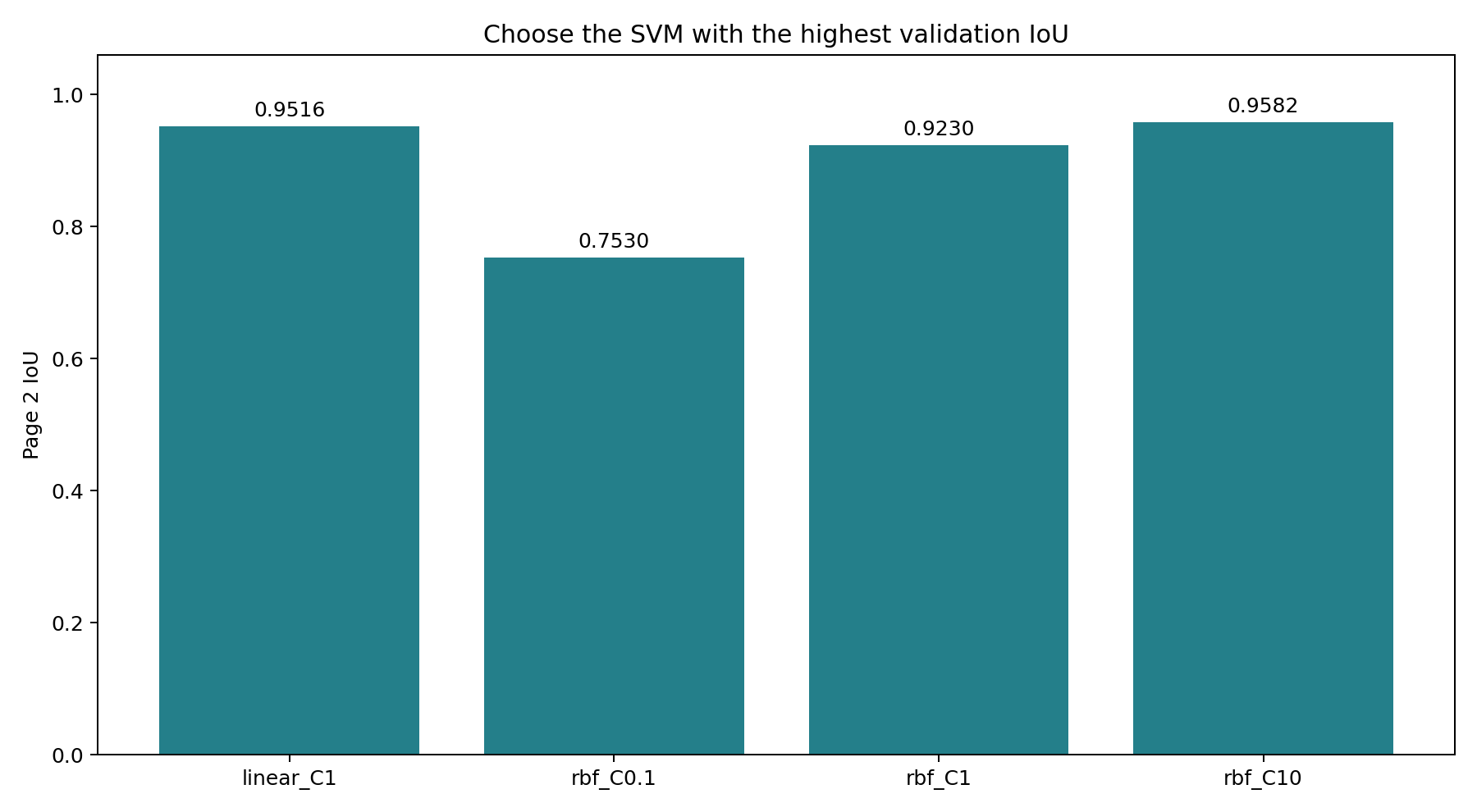
Figure 3. Compare the four SVM candidates on page 2; freeze the one with the highest validation IoU.
Task 05: Evaluate the Remaining Pages
Task 05-1: Description (0 pts.)
Open the Final Masks
Now load masks 3 and 4. Extract each page's features, transform with the existing scaler, predict with the frozen SVM, and reshape into an image. Measure its IoU and pixel accuracy against each supplied mask.
Report each page separately, then average the two IoU scores so both pages have equal weight.
A mask identifies regions; it does not identify characters or decode the text. The recovered pages remain in the notebook session for inspection. In HW05, we will use PCA and k-means to organize a separate pool of reference characters and prepare labeled training data for a recognizer.
Your Task
For each of pages 3 and 4:
- Extract the six pixel features with your function.
- Apply
scaler.transform(...)using the scaler already fitted on page 1. - Predict with
best_model, then reshape to the page's mask shape and convert to Boolean values.
The supplied code records the scores in final_table and keeps the predicted images in final_masks. Your work here connects the functions you've already checked; it does not fit a new model.
Task 05-1: Code (0.25 pts.)
final_rows = []
final_masks = {}
final_truth = {}
for page in [3, 4]:
    truth = read_mask(f'mask_page_{page}.png')

    # TODO: Use the existing scaler and frozen model, preserving image shape.
    features = None

    predicted = None

    final_masks[page] = predicted
    final_truth[page] = truth

    final_rows.append({'page': page, 'SVM_IoU': mask_iou(predicted, truth),
                       'SVM_accuracy': float(np.mean(predicted == truth))})

final_table = pd.DataFrame(final_rows)
print(final_table.to_string(index=False, float_format=lambda value: f'{value:.4f}'))
print(f'Mean held-out SVM IoU: {final_table.SVM_IoU.mean():.4f}')
Task 05-1: Reference Output (0 pts.)
 page  SVM_IoU  SVM_accuracy
    3   0.9630        0.9967
    4   0.9717        0.9989
Mean held-out SVM IoU: 0.9673
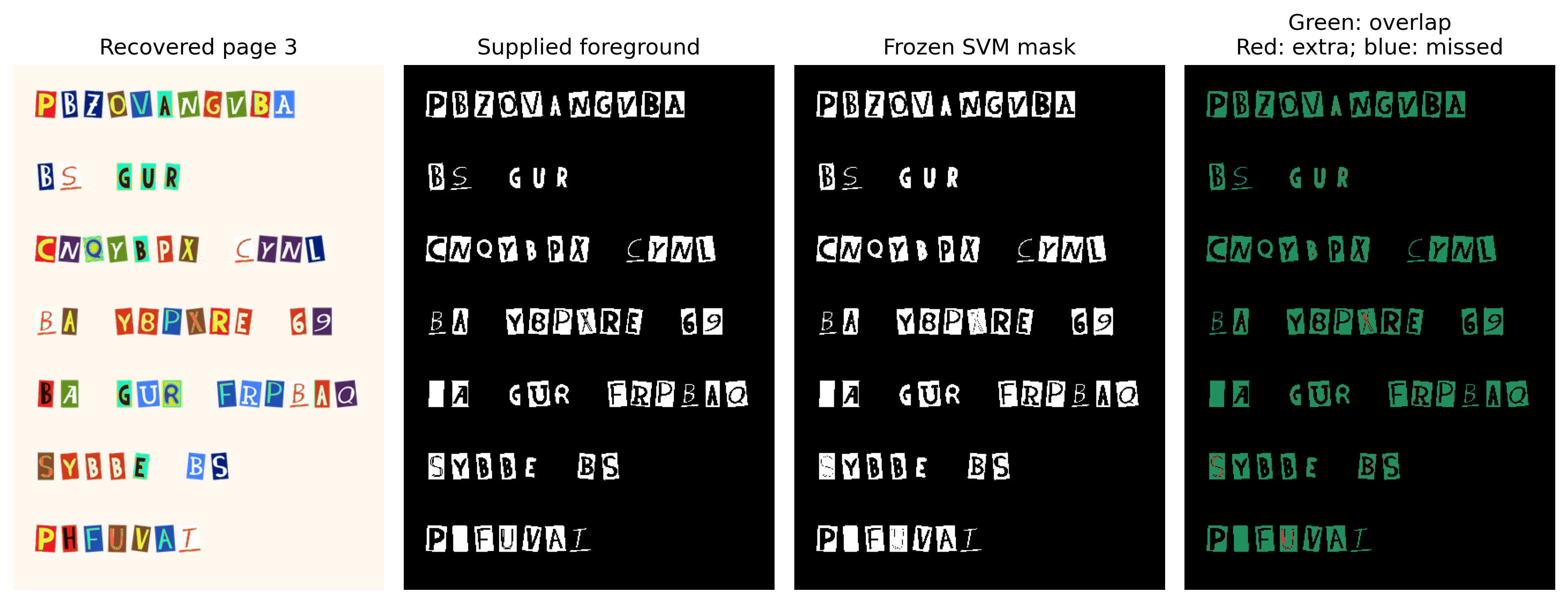
Figure 4. Held-out page 3. The evaluation compares dark printed regions, not complete letter bounding boxes or character identities.
Task 06: Report the Results to Caulfield
Task 06-1: Written Response (0.25 pts.)
- Which SVM won on page 2? Report its validation IoU and mean IoU on pages 3–4. What do these results suggest about performance on unseen pages, and why must you choose the model before inspecting the held-out masks?
[ANSWER]
- What happens to RBF similarity between distinct points when gamma increases? Why must pages 2–4 use the scaler fitted on page 1?
[ANSWER]
- What do your recovered images, predicted masks, and evaluation results tell Caulfield? Identify one question about the letters that these results still cannot answer.
[ANSWER]
Story Progression
Caulfield has recognizable page images again, along with a report that says exactly how well the pixel classifier worked. Your report identifies the selected SVM and gives its performance on two held-out pages. The intern asks whether he can put “forensic image analyst” on his résumé yet.
The colorful cut-out letters still need to be recognized. In HW05, we will prepare a small labeled reference dataset, using PCA and k-means to organize handwritten examples for human review. Those training examples will support the recognizer we begin building in HW06; the recovered note remains separate evidence.
Professor Dingler has some explaining to do. First, though, we need to read the letters.
Task 07: Export the Completed Notebook (0 pts.)
- Complete your code and written responses, and run the cells above in order. Compare your results with the expected and reference outputs.
- Save your notebook, including its outputs. Set
GENERATE = Truebelow when you are ready to export. - In Colab, the cell captures the current notebook and its outputs. Locally, it reads the saved notebook at
NOTEBOOK_PATH; adjust that path if you saved your copy elsewhere. - Download
homework04.htmland open it in a browser. Check that your name, NETID, code, written answers, and outputs appear.
Submit only homework04.html on Canvas. The exporter does not rerun your code.
Task 07-1: Code (0 pts.)
GENERATE = False
NOTEBOOK_PATH = DATA_ROOT / 'homeworks' / 'homework04' / 'homework04.ipynb'

if GENERATE:
    import json
    import nbformat
    from nbconvert import HTMLExporter
    from pathlib import Path

    try:
        from google.colab import _message, files
    except ImportError:
        current = nbformat.read(NOTEBOOK_PATH, as_version=4)
        html_path = NOTEBOOK_PATH.with_name('homework04.html')
        in_colab = False
    else:
        captured = _message.blocking_request('get_ipynb', timeout_sec=10)
        current = nbformat.reads(json.dumps(captured['ipynb']), as_version=4)
        html_path = Path('/content/homework04.html')
        in_colab = True

    exporter = HTMLExporter()
    exporter.embed_images = True
    report_html, _ = exporter.from_notebook_node(current)
    html_path.write_text(report_html, encoding='utf-8')
    print(f'Exported {html_path.name}. Open it in a browser before submitting.')

    if in_colab:
        files.download(str(html_path))
    else:
        print(f'Saved to: {html_path}')
else:
    print('Export disabled. Set GENERATE = True when ready.')
Task 07-1: Expected Output (0 pts.)
Export disabled. Set GENERATE = True when ready.