CSE 30124 - Introduction to Artificial Intelligence: Lab 02 (5 pts.)
- NETID:
This assignment covers the following topics:
- Image loading and channel manipulation with OpenCV
- Array reshaping with NumPy
- Row statistics with
np.mean(axis=), inverse permutations withnp.argsort - Broadcasting, distance computation, and
np.argminfor color-based pixel grouping - Boolean array operations and Intersection over Union (IoU) for image comparison
| Task | Description | Points |
|---|---|---|
| 00 | Setup | 0 |
| 01 | Re-order the Colors | 1 |
| 02 | Unshuffle the Scrambled Rows | 1 |
| 03 | Reverse the Color Cipher | 2 |
| 04 | Verify Recovery | 1 |
| 05 | Generate Police Report | 0 |
Please complete all sections. Some questions will require written answers, while others will involve coding. Be sure to run your code cells to verify your solutions.
Story Progression
While investigating the kidnapping, the forensics team discovers that the evidence database has been compromised. An intern — not sufficiently competent with his data structures — has corrupted the ransom note images in multiple ways. Due to being too stubborn to learn to use git, there's no backup of the files! The pixel data is still there, but it's been scrambled, shuffled, and recolored beyond recognition.
Director Bryant needs you to recover the evidence using your (soon to be developed) NumPy skills. Each file has been corrupted with two layers of scrambling, and you'll need to reverse-engineer the virus's steps one at a time. The techniques you learn here will build your foundation for Homework 03, where you'll implement full segmentation pipelines from scratch.
Task 00: Download Evidence
Task 00: Description (0 pts.)
Run the cell below to download the, unfortunately corrupted, evidence so you can try and reconstruct it properly!
Task 00: Code (0 pts.)
import os
import cv2
import numpy as np
import pandas as pd
import matplotlib.pyplot as plt

np.random.seed(42)

try:
    import google.colab
    REPO_URL = "https://github.com/wtheisen/nd-cse-30124-homeworks.git"

    REPO_NAME = "nd-cse-30124-homeworks"
    L_PATH = "nd-cse-30124-homeworks/evidence/lab02"

    %cd /content/
    !rm -r {REPO_NAME}

    # Clone repo
    if not os.path.exists(REPO_NAME):
        !git clone {REPO_URL}

        # cd into the data folder
        %cd {L_PATH}
        !pwd

except ImportError:
    print(os.getcwd())
    os.chdir("../../evidence/lab02")
Task 01: Re-order the Colors (1 pt.)
The first layer of corruption is a color channel swap. Images are stored as 3D NumPy arrays with shape (height, width, channels) where the channels are the color layers (Red, Green, Blue).
Different libraries store channels in different orders:
| Library | Channel Order | Notes |
|---|---|---|
OpenCV (cv2) |
BGR | Blue, Green, Red |
| Matplotlib | RGB | Red, Green, Blue |
| Most ML code | RGB | Standard convention |
If you display a BGR image with matplotlib, the colors will be wrong (reds appear blue, blues appear red). You need to convert between formats.
Loading Images with OpenCV
OpenCV's cv2.imread() is the standard way to load image files into Python. It returns a NumPy array.
# Load a color image (default) — returns shape (height, width, 3) in BGR order
image_bgr = cv2.imread("path/to/image.png")

# Load a grayscale image — returns shape (height, width), no channel dimension
mask = cv2.imread("path/to/mask.png", cv2.IMREAD_GRAYSCALE)

# Check what you got
print(image_bgr.shape)  # (595, 420, 3)
print(image_bgr.dtype)  # uint8 (values 0-255)
Converting Color Channels
cv2.cvtColor() converts between color spaces. The most common conversion is BGR ↔ RGB:
# Convert BGR -> RGB (for display with matplotlib)
image_rgb = cv2.cvtColor(image_bgr, cv2.COLOR_BGR2RGB)

# Convert RGB -> BGR (if you need to save with cv2.imwrite)
image_bgr = cv2.cvtColor(image_rgb, cv2.COLOR_RGB2BGR)
You can also do the same thing with NumPy array indexing, which reverses the channel order:
# Equivalent to cv2.cvtColor BGR -> RGB
image_rgb = image_bgr[:, :, ::-1]

# Access individual channels
blue  = image_bgr[:, :, 0]   # shape (height, width)
green = image_bgr[:, :, 1]
red   = image_bgr[:, :, 2]
Displaying Images with Matplotlib
plt.imshow() expects RGB images. For grayscale images or masks, use cmap='gray':
# Color image (must be RGB!)
plt.imshow(image_rgb)

# Grayscale image or mask
plt.imshow(mask, cmap='gray')

# Side-by-side display
fig, axes = plt.subplots(1, 2, figsize=(10, 5))
axes[0].imshow(image_rgb)
axes[1].imshow(mask, cmap='gray')
Task 01: Description (0 pts.)
Load all 4 scrambled ransom note pages and their ground truth masks from the evidence directory:
- Scrambled images:
scrambled_note_1.pngthroughscrambled_note_4.png— load withcv2.imread, convert BGR → RGB - Masks:
mask_page_1.pngthroughmask_page_4.png— load as grayscale withcv2.IMREAD_GRAYSCALE
Store the results in lists called images and masks. Print the count, and display Page 1 and its mask side by side.
Task 01: Code (1 pt.)
images = []
masks = []

for i in range(1, 5):
    # TODO: Load all 4 scrambled pages (BGR -> RGB) into `images`, all 4 masks into `masks`
    images.append(img)
    masks.append(msk)

print(f"Loaded {len(images)} images and {len(masks)} masks")
print(f"Image shape: {images[0].shape}, dtype: {images[0].dtype}")
print(f"Mask shape:  {masks[0].shape}, unique values: {np.unique(masks[0])}")

fig, axes = plt.subplots(1, 2, figsize=(10, 7))
axes[0].imshow(images[0])
axes[0].set_title("Page 1 (scrambled)")
axes[0].axis('off')
axes[1].imshow(masks[0], cmap='gray')
axes[1].set_title("Page 1 Mask")
axes[1].axis('off')
plt.tight_layout()
plt.show()
Task 01: Expected Output (0 pts.)
Loaded 4 images and 4 masks
Image shape: (595, 420, 3), dtype: uint8
Mask shape:  (595, 420), unique values: [  0 255]
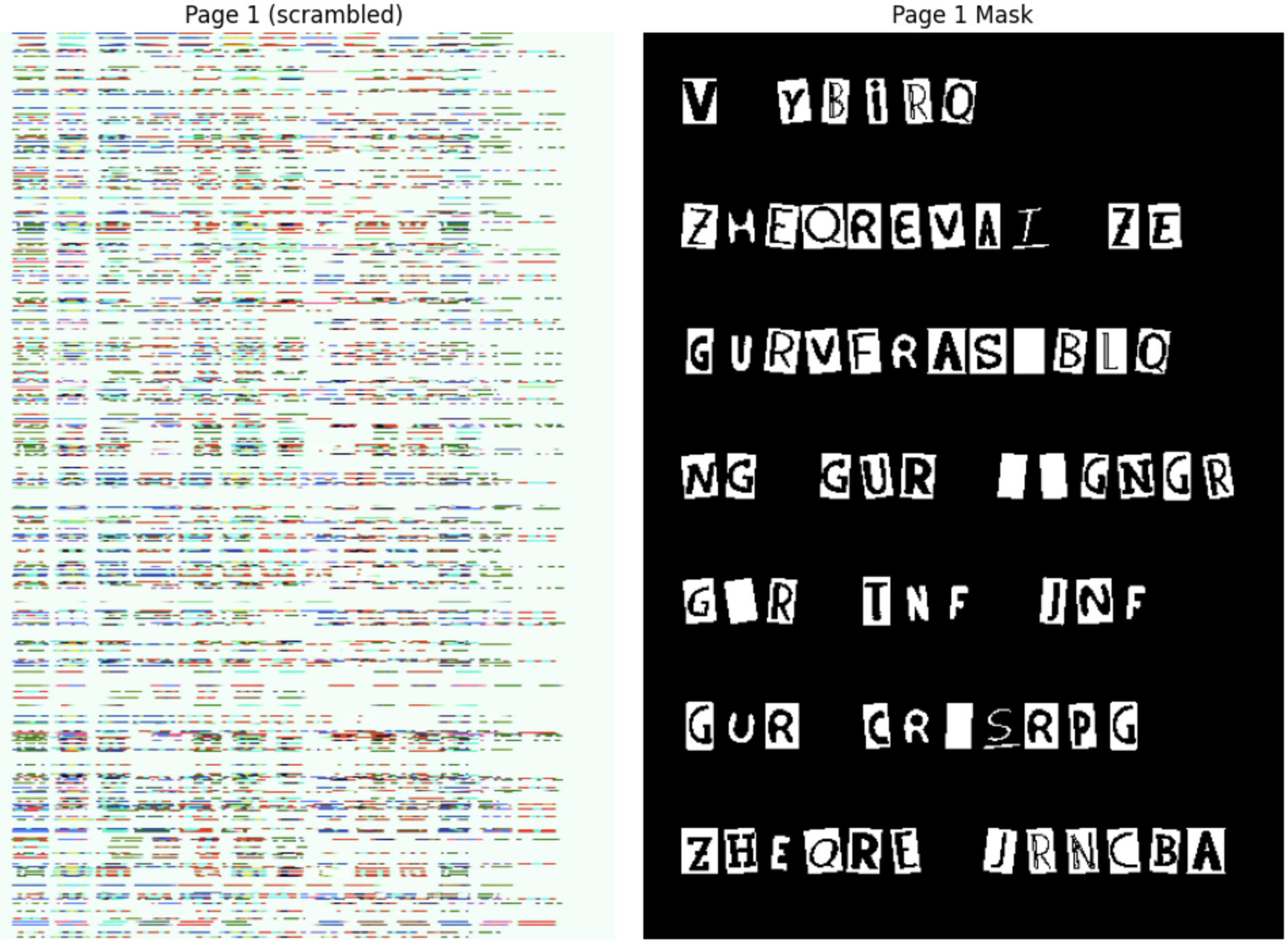
Plus a side-by-side display of Page 1 (scrambled — colors and rows will look wrong) and its mask (white = letter, black = background).
Story Progression
"Nice work." Detective Gaff says. But the corrupted files are still corrupted. The images are completely unrecognizable — the rows have been randomly shuffled. "The intern accidentally computed the mean brightness of each row and used the sum as a seed to generate a random permutation," says the forensics analyst. "The sum of row means doesn't change when you shuffle the rows — so you can compute the same seed from the scrambled image and reproduce the exact same permutation."
Task 02: Unshuffle the Scrambled Rows (1 pt.)
The intern somehow shuffled all image rows using a random permutation. But the seed wasn't hardcoded — it was derived from the image itself using row-level statistics. Specifically, the intern must have:
- Converted the image to grayscale
- Computed the mean brightness of each row with
np.mean(axis=1) - Summed those means to create a deterministic seed
- Used that seed to generate a random permutation
The key insight: the sum of row means is invariant to row permutation (it's just the sum of all pixel values divided by the width). So you can compute the exact same seed from the scrambled image.
Computing Row Statistics with np.mean(axis=)
np.mean() computes the mean of array elements. The axis parameter controls which dimension to average over:
# For a grayscale image with shape (height, width):
row_means = np.mean(gray, axis=1)   # mean of each ROW → shape (height,)
col_means = np.mean(gray, axis=0)   # mean of each COL → shape (width,)
overall   = np.mean(gray)           # single number
For a color image (height, width, 3), convert to grayscale first:
gray = cv2.cvtColor(image, cv2.COLOR_RGB2GRAY)   # (h, w)
row_brightness = np.mean(gray, axis=1)             # (h,)
The sum of row means is the same regardless of row order:
seed = int(np.round(np.sum(row_brightness))) % (2**31)
# This gives the same seed whether rows are shuffled or not!
Random Permutations with np.random.permutation()
np.random.permutation(n) returns a random reordering of [0, 1, 2, ..., n-1]:
np.random.seed(42)
perm = np.random.permutation(5)   # e.g. [0, 3, 4, 2, 1]
You can use this to shuffle the rows of an image:
shuffled = image[perm] # rows reordered according to perm
Inverting a Permutation with np.argsort()
np.argsort() returns the indices that would sort an array. When applied to a permutation, it gives the inverse permutation — the one that undoes the shuffle:
perm = np.random.permutation(5)     # e.g. [0, 3, 4, 2, 1]
inverse = np.argsort(perm)           # [0, 4, 3, 1, 2]

shuffled = image[perm]              # shuffle rows
recovered = shuffled[inverse]       # unshuffle — back to original!
Why does this work? perm[i] = j means "row i in the shuffled image came from row j in the original." np.argsort(perm) reverses this mapping.
Task 02: Description (0 pts.)
Unshuffle the rows to undo the second layer of corruption.
Steps:
- For each image, convert to grayscale:
cv2.cvtColor(image, cv2.COLOR_RGB2GRAY) - Compute per-row mean brightness:
row_means = np.mean(gray, axis=1) - Derive the seed:
seed = int(np.round(np.sum(row_means))) % (2**31) - Reproduce the permutation:
np.random.seed(seed)thennp.random.permutation(height) - Compute the inverse:
inverse = np.argsort(perm) - Apply:
unshuffled = image[inverse]
Note: After unshuffling, the images will still have wrong colors (the color cipher from layer 1). You'll fix that in Task 04.
Task 02: Code (1 pt.)
unshuffled_pages = []

for i in range(4):
    scrambled = images[i]
    h = scrambled.shape[0]

    # TODO: Compute row means and derive seed

    np.random.seed(seed)

    # Reproduce the intern's permutation
    perm = np.random.permutation(h)

    # TODO: Compute inverse permutation

    # TODO: Unshuffle rows

    unshuffled_pages.append(unshuffled)
    print(f"Page {i+1}: unshuffled shape = {unshuffled.shape}")

# Display Page 1: scrambled vs unshuffled (still color-ciphered)
fig, axes = plt.subplots(1, 2, figsize=(10, 7))
axes[0].imshow(images[0])
axes[0].set_title("Scrambled (shuffled + ciphered)")
axes[0].axis('off')
axes[1].imshow(unshuffled_pages[0])
axes[1].set_title("Unshuffled (still color-ciphered)")
axes[1].axis('off')
plt.tight_layout()
plt.show()
Task 02: Expected Output (0 pts.)
Page 1: unshuffled shape = (595, 420, 3)
Page 2: unshuffled shape = (595, 420, 3)
Page 3: unshuffled shape = (595, 420, 3)
Page 4: unshuffled shape = (595, 420, 3)
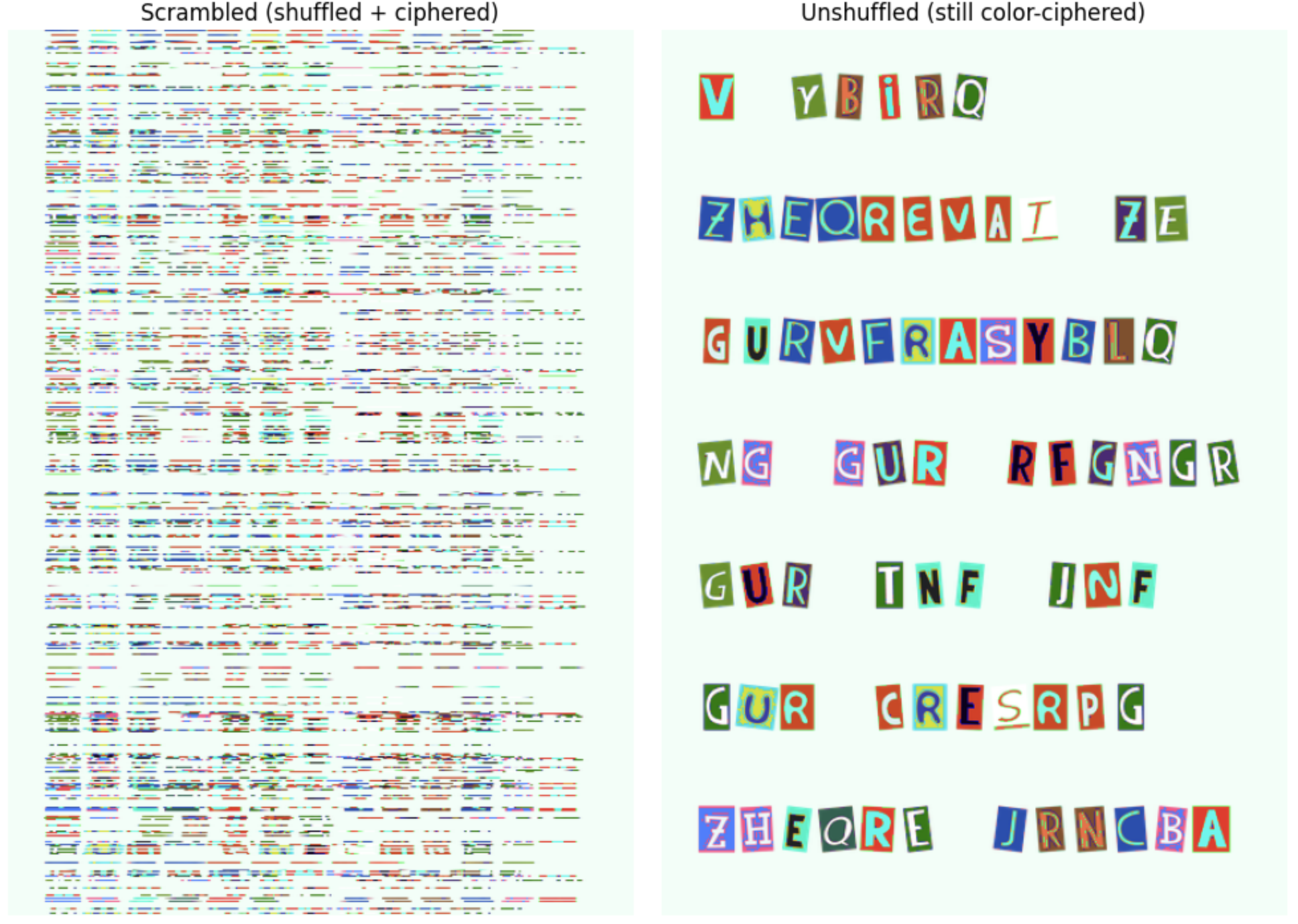
Story Progression
"The rows are back in order — good," says Director Bryant. "But look at the colors — they're still completely wrong." Some regions are tinted blue, others green. "That's the first layer of corruption," explains the forensics analyst. "Before shuffling the rows, the virus applied a color cipher. It grouped pixels by their similarity to three 'key colors', then rotated the RGB channels differently for each group. We know the key colors and the rotations — you just need to reverse them."
Task 03: Reverse the Color Cipher
The intern grouped every pixel by its distance to three "key colors", then applied a different RGB channel rotation to each group. To undo this, you need to:
- Figure out which group each pixel belongs to (by computing distances to the key colors)
- Reverse the channel rotation for each group
Broadcasting for Pairwise Distance
NumPy's broadcasting lets you compute distances between every pixel and every key color without loops:
pixels = image.reshape(-1, 3).astype(np.float64)  # (N, 3)
keys = np.array([[50, 40, 35],
                  [200, 180, 170],
                  [120, 140, 100]], dtype=np.float64)  # (K, 3)

# Expand dimensions for broadcasting:
# pixels[:, None, :] has shape (N, 1, 3)
# keys[None, :, :]   has shape (1, K, 3)
# Subtraction broadcasts to shape (N, K, 3)
diff = pixels[:, None, :] - keys[None, :, :]   # (N, K, 3)

# Squared Euclidean distance per pixel-key pair
sq_dist = np.sum(diff ** 2, axis=2)             # (N, K)

# Euclidean distance
dist = np.sqrt(sq_dist)                          # (N, K)
Finding the Nearest Key with np.argmin()
np.argmin() returns the index of the minimum value along an axis:
# For each pixel, which key color is closest?
groups = np.argmin(dist, axis=1)    # (N,) — values are 0, 1, or 2
Boolean Masking for Group Operations
Use boolean masks to select and modify pixels by group:
# Select all pixels in group 0
mask_g0 = (groups == 0)
group0_pixels = pixels[mask_g0]     # only the pixels nearest to key 0

# Modify only those pixels
pixels[mask_g0] = group0_pixels[:, [2, 0, 1]]  # channel rotation
Channel Rotations
A channel rotation reorders the R, G, B values of a pixel. For example:
[0, 1, 2]→ identity (no change)[1, 2, 0]→ RGB becomes GBR[2, 0, 1]→ RGB becomes BRG
To reverse a rotation, apply the inverse permutation:
- Forward
[1, 2, 0](RGB→GBR) → Inverse[2, 0, 1](GBR→RGB) - Forward
[2, 0, 1](RGB→BRG) → Inverse[1, 2, 0](BRG→RGB)
Your unshuffled images from Task 03 still have wrong colors — the intern applied a color cipher before shuffling.
What the intern did (for each page, before shuffling):
- Reshaped the image to a pixel matrix
(-1, 3)as float64 - Computed the Euclidean distance from each pixel to 3 key colors using broadcasting
- Assigned each pixel to its nearest key color with
np.argmin(axis=1) - Rotated channels per group:
- Group 0 (dark pixels):
[1, 2, 0](RGB → GBR) - Group 1 (light pixels):
[2, 0, 1](RGB → BRG) - Group 2 (mid pixels): no change (identity)
- Group 0 (dark pixels):
Task 03: Description (0 pts.)
Take each unshuffled_pages[i] from Task 03 and reverse the channel rotations.
Note: Since the key colors are not perfectly symmetric across channels, computing groups on the ciphered image is approximate — a small number of edge-case pixels near group boundaries may be assigned differently than the original. This means recovery will be very high but not necessarily pixel-perfect. You'll measure the actual accuracy in Task 05.
Steps:
- Reshape the unshuffled image to
(-1, 3)and convert to float64 - Compute distances to the key colors using broadcasting
- Assign pixels to groups with
np.argmin(axis=1) - Apply the inverse channel rotations per group
- Reshape back and convert to uint8
Key colors:
key_colors = np.array([[50, 40, 35], [200, 180, 170], [120, 140, 100]], dtype=np.float64)
Task 03: Code (1 pt.)
# FORENSIC ANALYST PROVIDED: Key colors used by the virus
key_colors = np.array([[50, 40, 35], [200, 180, 170], [120, 140, 100]], dtype=np.float64)

recovered_pages = []

for i in range(4):
    ciphered = unshuffled_pages[i]
    h, w, c = ciphered.shape

    # TODO: Reshape to pixel matrix and convert to float
    pixels = None

    # TODO: Compute distance from each pixel to each key color
    dists = None

    # TODO: Assign each pixel to nearest key color
    groups = None

    recovered_pixels = pixels.copy()
    # TODO: Reverse the channel rotations
    recovered_pixels[groups == 0] = None  # GBR → RGB
    recovered_pixels[groups == 1] = None  # BRG → RGB

    # TODO: Reshape back to image
    recovered = None

    recovered_pages.append(recovered)
    print(f"Page {i+1}: recovered shape = {recovered.shape}")

# Display Page 1: full pipeline
fig, axes = plt.subplots(1, 2, figsize=(10, 5))
axes[0].imshow(images[0])
axes[0].set_title("Scrambled (Task 01)")
axes[0].axis('off')
axes[1].imshow(recovered_pages[0])
axes[1].set_title("Recovered (Task 04)")
axes[1].axis('off')
plt.tight_layout()
plt.show()
Task 03: Expected Output (1 pt.)
Page 1: recovered shape = (595, 420, 3)
Page 2: recovered shape = (595, 420, 3)
Page 3: recovered shape = (595, 420, 3)
Page 4: recovered shape = (595, 420, 3)
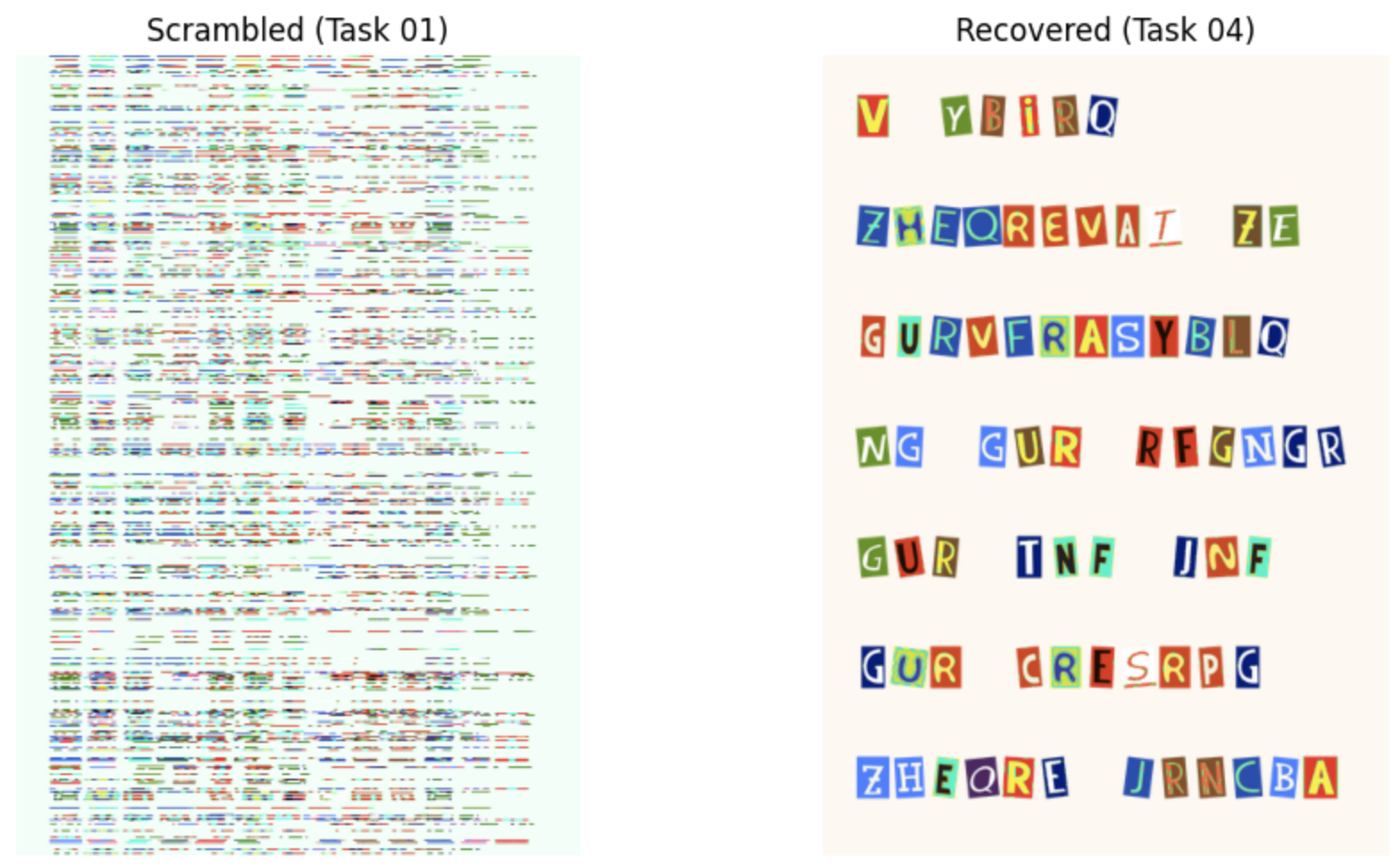
Story Progression
"Excellent — the images look right again," says Detective Gaff, visually comparing your recovered pages to the originals. "But we need to prove it quantitatively for the report. The prosecutor needs to know: how well does the recovered text match the original evidence masks? Give me an actual number, maybe Intersection over Union — the standard metric for measuring overlap between two regions would work."
Task 04: Verify Recovery
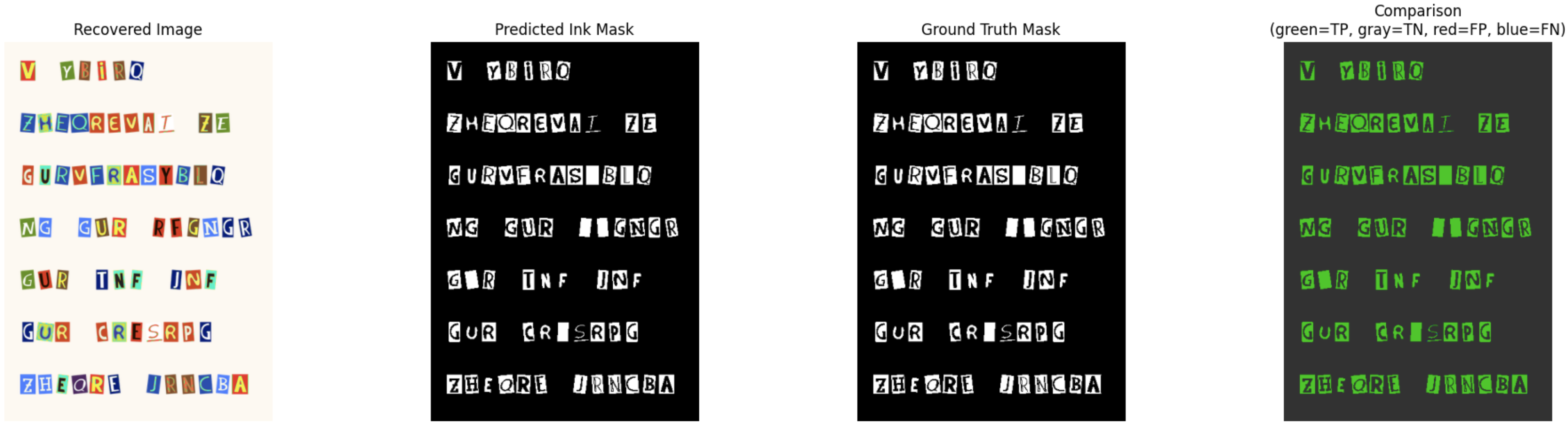
Now that the images are recovered, you need to verify the quality of the recovery. You'll threshold the recovered images to extract ink masks and compare them against the ground truth masks using the metric: Intersection over Union (IoU).
Boolean Operators on NumPy Arrays
These work element-wise on arrays of any shape:
| Operation | Code | Meaning |
|---|---|---|
| AND | np.logical_and(a, b) |
True where both are True |
| OR | np.logical_or(a, b) |
True where either is True |
| NOT | ~a |
Flip True ↔ False |
| Count | .sum() |
Number of True values (True=1, False=0) |
a = np.array([True,  True, False, False])
b = np.array([True, False,  True, False])

np.logical_and(a, b)   # [True, False, False, False]  — both True
np.logical_or(a, b)    # [True,  True,  True, False]  — either True
~a                     # [False, False,  True,  True]  — flipped
np.logical_and(a, b).sum()  # 1 — count of True values
Intersection over Union (IoU)
IoU (also called the Jaccard index) measures overlap between two binary masks. It's the standard metric for evaluating segmentation quality:
IoU = |A ∩ B| / |A ∪ B|
    = (pixels in BOTH masks) / (pixels in EITHER mask)
Prediction: ████████░░░░ Ground Truth: ░░░░████████Intersection: ░░░░████░░░░ (both = True) Union: ████████████ (either = True)
IoU = 4/12 = 0.333
In NumPy:
pred_bool = pred_mask > 0      # boolean: True where ink predicted
truth_bool = truth_mask > 0    # boolean: True where ink actually is

intersection = np.logical_and(pred_bool, truth_bool).sum()
union = np.logical_or(pred_bool, truth_bool).sum()

iou = intersection / union
Task 04: Description (0 pts.)
For each recovered page:
- Convert the recovered image to grayscale
- Threshold at
< 140to create a predicted ink mask (dark pixels = ink) - Compare the predicted mask against the ground truth mask using pixel accuracy and IoU
This tests the full pipeline: unshuffle → decipher → threshold → compare to ground truth.
Task 04: Code (1 pt.)
print("=== Ink Mask IoU (recovered → threshold → vs ground truth) ===")
for i in range(4):
    recovered = recovered_pages[i]

    # TODO: Convert to grayscale and threshold to get predicted ink mask
    gray = None
    pred_mask = None # dark pixels = ink

    # TODO: Ground truth mask
    truth_mask = None

    # TODO: Comput IoU
    intersection = None
    union = None
    iou = None

    print(f"  Page {i+1}: IoU = {iou:.4f} | intersection = {intersection}, union = {union}")

# Display comparison for Page 1
gray = cv2.cvtColor(recovered_pages[0], cv2.COLOR_RGB2GRAY)
pred_mask = gray < 140
truth_mask = masks[0] > 0

# Color-coded: green = both agree, red = disagree
comparison = np.zeros((*pred_mask.shape, 3), dtype=np.uint8)
both_ink = np.logical_and(pred_mask, truth_mask)       # true positive
both_bg = np.logical_and(~pred_mask, ~truth_mask)      # true negative
comparison[both_ink] = [0, 200, 0]                      # green
comparison[both_bg] = [50, 50, 50]                      # dark gray
comparison[np.logical_and(pred_mask, ~truth_mask)] = [200, 0, 0]   # red = false positive
comparison[np.logical_and(~pred_mask, truth_mask)] = [0, 0, 200]   # blue = false negative

fig, axes = plt.subplots(1, 4, figsize=(20, 5))
axes[0].imshow(recovered_pages[0])
axes[0].set_title("Recovered Image")
axes[0].axis('off')
axes[1].imshow(pred_mask, cmap='gray')
axes[1].set_title("Predicted Ink Mask")
axes[1].axis('off')
axes[2].imshow(masks[0], cmap='gray')
axes[2].set_title("Ground Truth Mask")
axes[2].axis('off')
axes[3].imshow(comparison)
axes[3].set_title("Comparison\n(green=TP, gray=TN, red=FP, blue=FN)")
axes[3].axis('off')
plt.tight_layout()
plt.show()
Task 04: Expected Output (0 pts.)
=== Ink Mask IoU (recovered → threshold → vs ground truth) ===
  Page 1: IoU = 0.9983 | intersection = 26948, union = 26993
  Page 2: IoU = 0.9973 | intersection = 19735, union = 19788
  Page 3: IoU = 0.9972 | intersection = 21783, union = 21845
  Page 4: IoU = 0.9985 | intersection = 9452, union = 9466
NOTE: I think these should be the exact numbers, but as long as yours are close it's okay.
Story Progression
You've successfully recovered the corrupted ransom note evidence! Along the way you practiced core NumPy skills:
cv2.imread+cvtColor— loading and fixing image datareshape+flatten— converting between image and flat array formatsnp.mean(axis=1)+np.argsort()— computing row statistics, deriving a seed from image properties, and computing inverse permutations- Broadcasting
(X[:, None, :] - refs[None, :, :])+np.argmin()— computing pairwise distances and assigning pixels to groups np.linalg.norm()— verifying recovery qualitynp.logical_and,np.logical_or, pixel accuracy, IoU — boolean mask comparison and standard evaluation metrics
In Homework 03, you'll build on these foundations to implement full segmentation pipelines using PCA, K-means clustering, and more sophisticated applications of these evaluation metrics. Time to file your report!
Task 05: Generate Police Report
Taks 05: Description (0 pts.)
Run the code cell below to generate a report for the Police and submit it on Canvas!
Task 05: Code (0 pts.)
import os, json

ASS_PATH = "nd-cse-30124-homeworks/labs"
ASS = "lab02"

try:
    from google.colab import _message, files

    repo_ipynb_path = f"/content/{ASS_PATH}/{ASS}/{ASS}.ipynb"

    nb = _message.blocking_request("get_ipynb", timeout_sec=1)["ipynb"]

    os.makedirs(os.path.dirname(repo_ipynb_path), exist_ok=True)
    with open(repo_ipynb_path, "w", encoding="utf-8") as f:
        json.dump(nb, f)

    !jupyter nbconvert --to html "{repo_ipynb_path}"
    files.download(repo_ipynb_path.replace(".ipynb", ".html"))
except:
    import subprocess

    nb_fp = os.getcwd() + f'/{ASS}.ipynb'
    print(os.getcwd())

    subprocess.run(["jupyter", "nbconvert", "--to", "html", nb_fp], check=True)
finally:
    print('[WARNING]: Unable to export notebook as .html')